Lead UI/UX
B2C Tire eCommerce
B2C Tire eCommerce
B2C Tire eCommerce
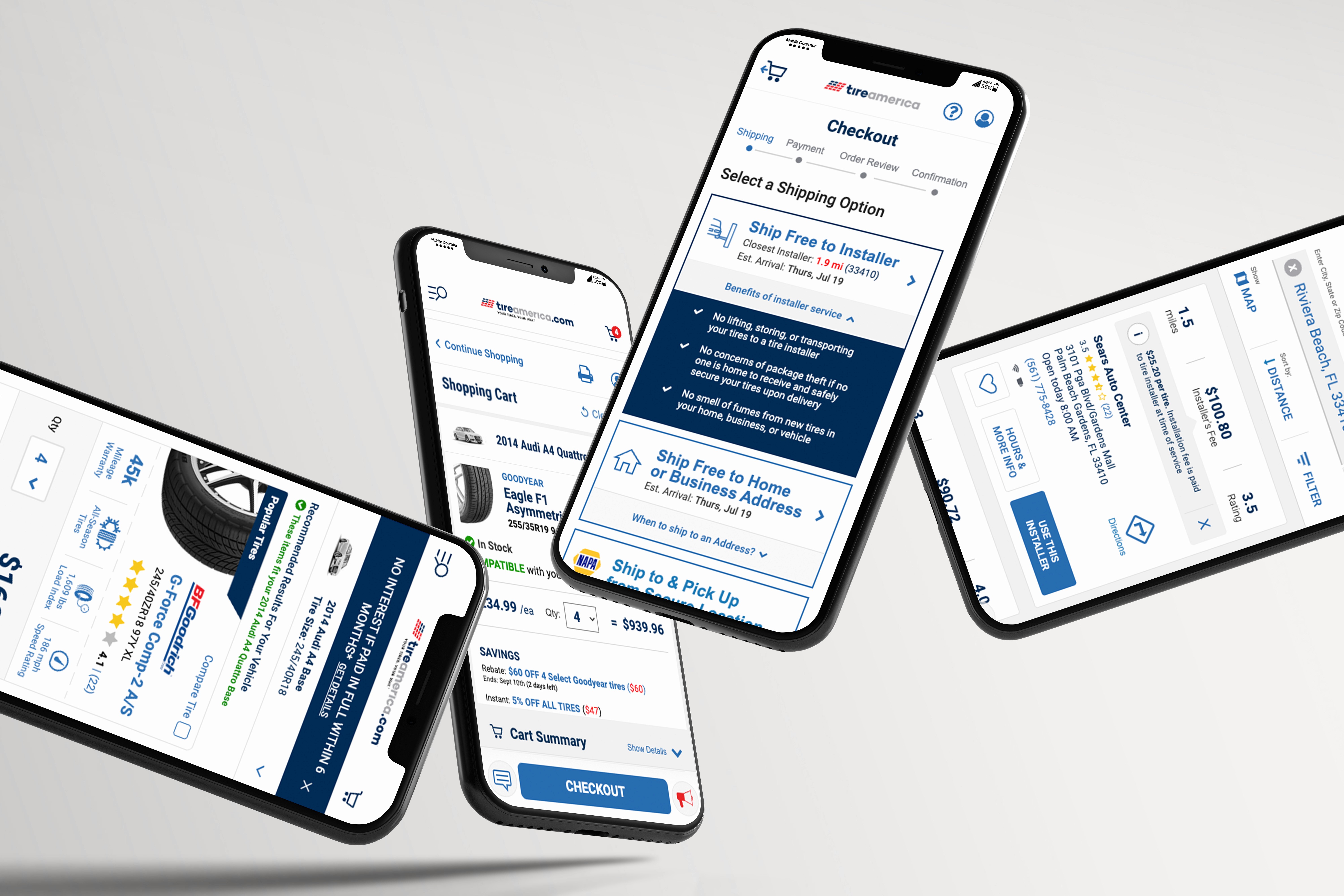
Audited an agency-built experience, identified friction points, and ran iterative prototype testing to deliver dev-ready wireframes that improved key journeys.
Audited an agency-built experience, identified friction points, and ran iterative prototype testing to deliver dev-ready wireframes that improved key journeys.
Audited an agency-built experience, identified friction points, and ran iterative prototype testing to deliver dev-ready wireframes that improved key journeys.
Year
2018-2020
Year
2018-2020
Year
2018-2020
Client
Tire America
Client
Tire America
Client
Tire America
Industry
Online B2C Ecommerce
Industry
Online B2C Ecommerce
Industry
Online B2C Ecommerce
Role
Principal UI/UX
Role
Principal UI/UX
Role
Principal UI/UX
Duration
2 Years
Duration
2 Years
Duration
2 Years
Teams
Product, Engineering, Digital Analystics, Brand
Teams
Product, Engineering, Digital Analystics, Brand
Teams
Product, Engineering, Digital Analystics, Brand
Principal UI/UX — Shopping, Checkout, Shipping & Order Tracking
TireAmerica.com | Late 2018–2020
I served as the principal UI/UX designer for the end-to-end TireAmerica.com ecommerce experience. The platform was originally designed by an external agency, and I was brought in to lead iterative refinement—especially across checkout and conversion-critical funnels.
I partnered closely with the Product Owner and engineers in our pod, working in an agile cadence (daily standups, sprint planning, Jira ticketing, and iterative handoff).
While TireAmerica.com was ultimately shut down before many improvements fully shipped, the work represents a conversion-focused redesign of a complex purchase and fulfillment journey.
Objective
Improve conversion and reduce drop-off across the purchase journey:
Tire PLP → Cart → Shipping & Installer Selection → Payment → Review → Confirmation
Plus key post-purchase flows like Track My Order.
Approach
I audited the funnel end-to-end and prioritized opportunities using:
Business and customer support feedback
Session reviews (behavioral observation)
Heuristic evaluation
Competitive benchmarking
This process surfaced high-friction moments—particularly where customers had to make complex fulfillment decisions under time pressure.
Key Improvements I Drove…
1) Product Listing Page (PLP) clarity + confidence
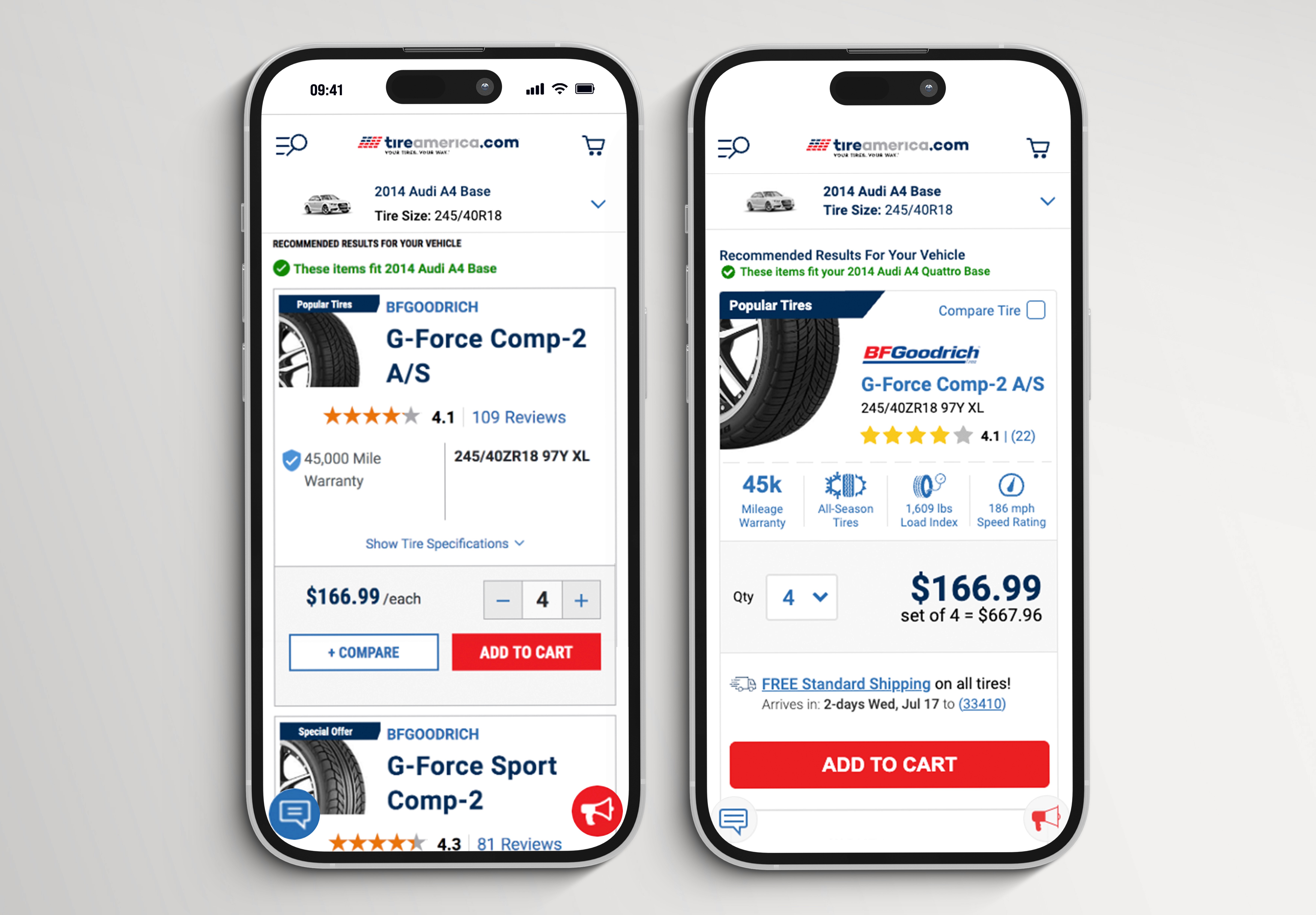
I redesigned the PLP product cards to better support decision-making by surfacing:
Estimated delivery timing (shipping ETA)
Key product specs and fit-related information
Clearer hierarchy and scannability across the list
Outcome: reduced ambiguity earlier in the funnel and set expectations before customers entered checkout.
Before
Product cards didn’t surface enough decision-making info at a glance.
Shipping ETA and key specs weren’t prominent, making comparison harder and increasing uncertainty.
The visual hierarchy didn’t support quick scanning across many tire options.
After
Redesigned PLP cards to surface shipping ETA and key specs up front.
Improved hierarchy and readability so users could compare faster with more confidence.
Reduced the need to click into PDPs just to answer basic questions.
Built to scale for additional merchandising needs like Same-Day Delivery ETAs, coupons, and more
2) Shipping and fulfillment re-architecture (major friction point)
Shipping information was previously displayed in the cart above the primary CTA, where it was often overlooked or skipped. More importantly, the experience bundled multiple fulfillment types into a single step, increasing confusion—especially across:
Ship to installer / Schedule Appointment
Ship to home
Ship to a secure/safe place
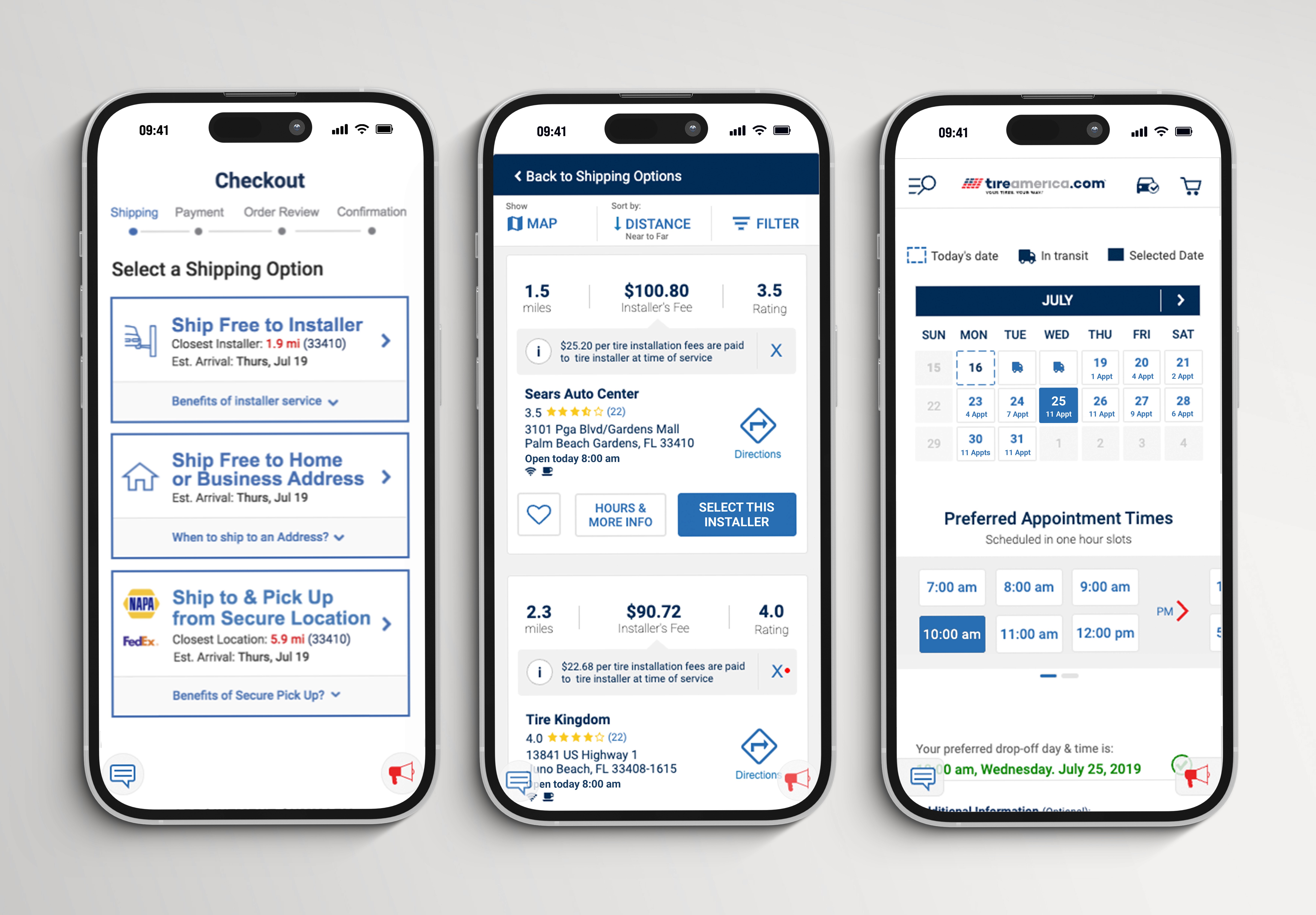
I proposed and designed a dedicated Shipping step within a stepper, giving each option:
Its own clear explanation (“Benefits of…” messaging)
A more guided decision model instead of a mixed, competing UI
Before
Shipping details lived in the cart and appeared above the primary CTA, so many users skipped or missed it.
With only two fulfillment options—Ship to Installer or Ship to Home—embedded in a busy step, customers often skipped the choice and returned confused later, creating a clear UX challenge when the business requested a third option.
The flow didn’t guide users through a clear decision, increasing friction at a high-intent moment.
We streamlined the scheduler UI, but session reviews showed mobile usability issues: swiping often panned the page or accidentally selected a time, and when shipping/in-transit dates extended beyond three days, some users didn’t realize they needed to swipe left to see additional days.
After
Pulled Shipping out of the cart and made it a dedicated step in a stepper flow.
Separated fulfillment choices into distinct, guided options.
Added “Benefits of…” content per option to help users pick confidently (and reduce second-guessing).
Redesigned the UI for Installer, Ship to Home, and Ship to Safe Place flows.
Reworked the appointment scheduler into a more familiar pattern to reduce mis-taps and eliminate reliance on swiping, with a clear AM/PM split to improve scanability and help customers quickly choose the right time slot.
Added day-level availability upfront (how many appointments were open per day).
3) Installer selection improvements
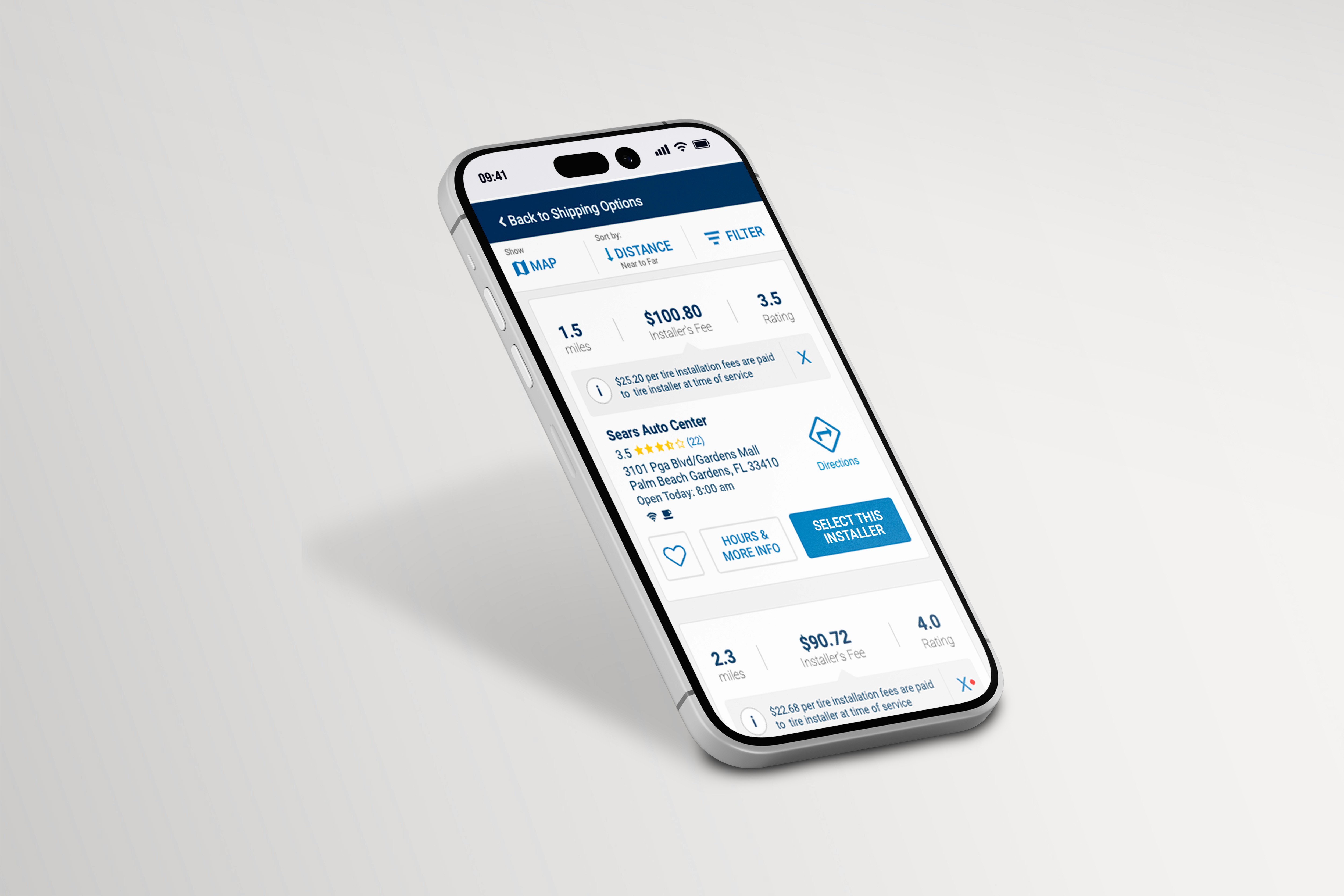
Within the ship-to-installer path, I redesigned the installer selection experience to support confident choice, including:
Distance and ratings
Installer pricing - with price-per-tire installer for easier cost comparison.
Save/favorite
Hours and directions
This step aimed to reduce decision fatigue while making the installer path feel trustworthy and easy.
Before
Installer selection didn’t provide enough context to make an informed choice quickly.
Key comparison signals (distance, ratings, pricing, hours) weren’t structured for fast scanning.
After
Designed a more decision-supportive installer selection step with:
distance + ratings
installer pricing
hours + directions
favorite/save option
Reduced decision fatigue while making the installer path feel more trustworthy.
Note
The visuals shown here are Figma comps; these updates are currently pending integration.

{
Get in touch
}
Let’s shape what’s next.

Lea Wenban
Senior/Principle Product Designer (UI/UX)
I build robust enterprise experiences—design systems, end-to-end journeys, and clean UI that goes from concept to launch without drama.
That said, I’m a real person who’s easy to work with, keeps ego in check, and loves constructive critique (bring it on!).
Coffee’s on me (virtually) — drop me a line.
Lead UI/UX
B2C Tire eCommerce
B2C Tire eCommerce
B2C Tire eCommerce
Audited an agency-built experience, identified friction points, and ran iterative prototype testing to deliver dev-ready wireframes that improved key journeys.
Audited an agency-built experience, identified friction points, and ran iterative prototype testing to deliver dev-ready wireframes that improved key journeys.
Audited an agency-built experience, identified friction points, and ran iterative prototype testing to deliver dev-ready wireframes that improved key journeys.
Year
2018-2020
Year
2018-2020
Year
2018-2020
Client
Tire America
Client
Tire America
Client
Tire America
Industry
Online B2C Ecommerce
Industry
Online B2C Ecommerce
Industry
Online B2C Ecommerce
Role
Principal UI/UX
Role
Principal UI/UX
Role
Principal UI/UX
Duration
2 Years
Duration
2 Years
Duration
2 Years
Teams
Product, Engineering, Digital Analystics, Brand
Teams
Product, Engineering, Digital Analystics, Brand
Teams
Product, Engineering, Digital Analystics, Brand
Principal UI/UX — Shopping, Checkout, Shipping & Order Tracking
TireAmerica.com | Late 2018–2020
I served as the principal UI/UX designer for the end-to-end TireAmerica.com ecommerce experience. The platform was originally designed by an external agency, and I was brought in to lead iterative refinement—especially across checkout and conversion-critical funnels.
I partnered closely with the Product Owner and engineers in our pod, working in an agile cadence (daily standups, sprint planning, Jira ticketing, and iterative handoff).
While TireAmerica.com was ultimately shut down before many improvements fully shipped, the work represents a conversion-focused redesign of a complex purchase and fulfillment journey.
Objective
Improve conversion and reduce drop-off across the purchase journey:
Tire PLP → Cart → Shipping & Installer Selection → Payment → Review → Confirmation
Plus key post-purchase flows like Track My Order.
Approach
I audited the funnel end-to-end and prioritized opportunities using:
Business and customer support feedback
Session reviews (behavioral observation)
Heuristic evaluation
Competitive benchmarking
This process surfaced high-friction moments—particularly where customers had to make complex fulfillment decisions under time pressure.
Key Improvements I Drove…
1) Product Listing Page (PLP) clarity + confidence
I redesigned the PLP product cards to better support decision-making by surfacing:
Estimated delivery timing (shipping ETA)
Key product specs and fit-related information
Clearer hierarchy and scannability across the list
Outcome: reduced ambiguity earlier in the funnel and set expectations before customers entered checkout.
Before
Product cards didn’t surface enough decision-making info at a glance.
Shipping ETA and key specs weren’t prominent, making comparison harder and increasing uncertainty.
The visual hierarchy didn’t support quick scanning across many tire options.
After
Redesigned PLP cards to surface shipping ETA and key specs up front.
Improved hierarchy and readability so users could compare faster with more confidence.
Reduced the need to click into PDPs just to answer basic questions.
Built to scale for additional merchandising needs like Same-Day Delivery ETAs, coupons, and more
2) Shipping and fulfillment re-architecture (major friction point)
Shipping information was previously displayed in the cart above the primary CTA, where it was often overlooked or skipped. More importantly, the experience bundled multiple fulfillment types into a single step, increasing confusion—especially across:
Ship to installer / Schedule Appointment
Ship to home
Ship to a secure/safe place
I proposed and designed a dedicated Shipping step within a stepper, giving each option:
Its own clear explanation (“Benefits of…” messaging)
A more guided decision model instead of a mixed, competing UI
Before
Shipping details lived in the cart and appeared above the primary CTA, so many users skipped or missed it.
With only two fulfillment options—Ship to Installer or Ship to Home—embedded in a busy step, customers often skipped the choice and returned confused later, creating a clear UX challenge when the business requested a third option.
The flow didn’t guide users through a clear decision, increasing friction at a high-intent moment.
We streamlined the scheduler UI, but session reviews showed mobile usability issues: swiping often panned the page or accidentally selected a time, and when shipping/in-transit dates extended beyond three days, some users didn’t realize they needed to swipe left to see additional days.
After
Pulled Shipping out of the cart and made it a dedicated step in a stepper flow.
Separated fulfillment choices into distinct, guided options.
Added “Benefits of…” content per option to help users pick confidently (and reduce second-guessing).
Redesigned the UI for Installer, Ship to Home, and Ship to Safe Place flows.
Reworked the appointment scheduler into a more familiar pattern to reduce mis-taps and eliminate reliance on swiping, with a clear AM/PM split to improve scanability and help customers quickly choose the right time slot.
Added day-level availability upfront (how many appointments were open per day).
3) Installer selection improvements
Within the ship-to-installer path, I redesigned the installer selection experience to support confident choice, including:
Distance and ratings
Installer pricing - with price-per-tire installer for easier cost comparison.
Save/favorite
Hours and directions
This step aimed to reduce decision fatigue while making the installer path feel trustworthy and easy.
Before
Installer selection didn’t provide enough context to make an informed choice quickly.
Key comparison signals (distance, ratings, pricing, hours) weren’t structured for fast scanning.
After
Designed a more decision-supportive installer selection step with:
distance + ratings
installer pricing
hours + directions
favorite/save option
Reduced decision fatigue while making the installer path feel more trustworthy.
Note
The visuals shown here are Figma comps; these updates are currently pending integration.
{
Get in touch
}
Let’s shape what’s next.
Lea Wenban
Senior/Principle Product Designer (UI/UX)
I build robust enterprise experiences—design systems, end-to-end journeys, and clean UI that goes from concept to launch without drama.
That said, I’m a real person who’s easy to work with, keeps ego in check, and loves constructive critique (bring it on!).
Coffee’s on me (virtually) — drop me a line.
Lead UI/UX
B2C Tire eCommerce
B2C Tire eCommerce
B2C Tire eCommerce
Audited an agency-built experience, identified friction points, and ran iterative prototype testing to deliver dev-ready wireframes that improved key journeys.
Audited an agency-built experience, identified friction points, and ran iterative prototype testing to deliver dev-ready wireframes that improved key journeys.
Audited an agency-built experience, identified friction points, and ran iterative prototype testing to deliver dev-ready wireframes that improved key journeys.
Year
2018-2020
Year
2018-2020
Year
2018-2020
Client
Tire America
Client
Tire America
Client
Tire America
Industry
Online B2C Ecommerce
Industry
Online B2C Ecommerce
Industry
Online B2C Ecommerce
Role
Principal UI/UX
Role
Principal UI/UX
Role
Principal UI/UX
Duration
2 Years
Duration
2 Years
Duration
2 Years
Teams
Product, Engineering, Digital Analystics, Brand
Teams
Product, Engineering, Digital Analystics, Brand
Teams
Product, Engineering, Digital Analystics, Brand
Principal UI/UX — Shopping, Checkout, Shipping & Order Tracking
TireAmerica.com | Late 2018–2020
I served as the principal UI/UX designer for the end-to-end TireAmerica.com ecommerce experience. The platform was originally designed by an external agency, and I was brought in to lead iterative refinement—especially across checkout and conversion-critical funnels.
I partnered closely with the Product Owner and engineers in our pod, working in an agile cadence (daily standups, sprint planning, Jira ticketing, and iterative handoff).
While TireAmerica.com was ultimately shut down before many improvements fully shipped, the work represents a conversion-focused redesign of a complex purchase and fulfillment journey.
Objective
Improve conversion and reduce drop-off across the purchase journey:
Tire PLP → Cart → Shipping & Installer Selection → Payment → Review → Confirmation
Plus key post-purchase flows like Track My Order.
Approach
I audited the funnel end-to-end and prioritized opportunities using:
Business and customer support feedback
Session reviews (behavioral observation)
Heuristic evaluation
Competitive benchmarking
This process surfaced high-friction moments—particularly where customers had to make complex fulfillment decisions under time pressure.
Key Improvements I Drove…
1) Product Listing Page (PLP) clarity + confidence
I redesigned the PLP product cards to better support decision-making by surfacing:
Estimated delivery timing (shipping ETA)
Key product specs and fit-related information
Clearer hierarchy and scannability across the list
Outcome: reduced ambiguity earlier in the funnel and set expectations before customers entered checkout.
Before
Product cards didn’t surface enough decision-making info at a glance.
Shipping ETA and key specs weren’t prominent, making comparison harder and increasing uncertainty.
The visual hierarchy didn’t support quick scanning across many tire options.
After
Redesigned PLP cards to surface shipping ETA and key specs up front.
Improved hierarchy and readability so users could compare faster with more confidence.
Reduced the need to click into PDPs just to answer basic questions.
Built to scale for additional merchandising needs like Same-Day Delivery ETAs, coupons, and more
2) Shipping and fulfillment re-architecture (major friction point)
Shipping information was previously displayed in the cart above the primary CTA, where it was often overlooked or skipped. More importantly, the experience bundled multiple fulfillment types into a single step, increasing confusion—especially across:
Ship to installer / Schedule Appointment
Ship to home
Ship to a secure/safe place
I proposed and designed a dedicated Shipping step within a stepper, giving each option:
Its own clear explanation (“Benefits of…” messaging)
A more guided decision model instead of a mixed, competing UI
Before
Shipping details lived in the cart and appeared above the primary CTA, so many users skipped or missed it.
With only two fulfillment options—Ship to Installer or Ship to Home—embedded in a busy step, customers often skipped the choice and returned confused later, creating a clear UX challenge when the business requested a third option.
The flow didn’t guide users through a clear decision, increasing friction at a high-intent moment.
We streamlined the scheduler UI, but session reviews showed mobile usability issues: swiping often panned the page or accidentally selected a time, and when shipping/in-transit dates extended beyond three days, some users didn’t realize they needed to swipe left to see additional days.
After
Pulled Shipping out of the cart and made it a dedicated step in a stepper flow.
Separated fulfillment choices into distinct, guided options.
Added “Benefits of…” content per option to help users pick confidently (and reduce second-guessing).
Redesigned the UI for Installer, Ship to Home, and Ship to Safe Place flows.
Reworked the appointment scheduler into a more familiar pattern to reduce mis-taps and eliminate reliance on swiping, with a clear AM/PM split to improve scanability and help customers quickly choose the right time slot.
Added day-level availability upfront (how many appointments were open per day).
3) Installer selection improvements
Within the ship-to-installer path, I redesigned the installer selection experience to support confident choice, including:
Distance and ratings
Installer pricing - with price-per-tire installer for easier cost comparison.
Save/favorite
Hours and directions
This step aimed to reduce decision fatigue while making the installer path feel trustworthy and easy.
Before
Installer selection didn’t provide enough context to make an informed choice quickly.
Key comparison signals (distance, ratings, pricing, hours) weren’t structured for fast scanning.
After
Designed a more decision-supportive installer selection step with:
distance + ratings
installer pricing
hours + directions
favorite/save option
Reduced decision fatigue while making the installer path feel more trustworthy.
Note
The visuals shown here are Figma comps; these updates are currently pending integration.
{
Get in touch
}
Let’s shape what’s next.
Lea Wenban
Senior/Principle Product Designer (UI/UX)
I build robust enterprise experiences—design systems, end-to-end journeys, and clean UI that goes from concept to launch without drama.
That said, I’m a real person who’s easy to work with, keeps ego in check, and loves constructive critique (bring it on!).
Coffee’s on me (virtually) — drop me a line.